 Wallgami


Some wallpaper apps can run a program as a wallpaper. Wallgami cannot.
In several of these apps a “wallpaper” can be an ordinary Windows program. It is a real feature, with real uses. It is also the feature that got used.
On 16 June 2026, Kaspersky reported dozens of wallpapers on the Steam Workshop that installed password stealers, backdoors, cryptocurrency miners and ransomware on the machines of people who applied them. They had been downloaded thousands of times each. Two weeks later, on 29 June 2026, Wallpaper Engine stopped distributing that kind of wallpaper through the Workshop.
None of that makes Wallpaper Engine malware. It is not, it did not upload anything, and pulling the feature was the right call. The point is narrower and it outlives the incident: a wallpaper that can run a program is a wallpaper that can run somebody else's program. Wallpaper Engine's change was to stop distributing them — you can still run one locally today. Lively documents application wallpapers as a supported type.
Wallgami has never had the ability. There is no code in it that starts a wallpaper as a program, so there is no setting to get wrong and nothing to switch off. Programs are refused when you try to import one, and stripped out of web wallpaper folders. Web wallpapers run in a sandbox with the network denied — every request is refused. On a Mac you can turn networking on for one wallpaper at a time.
Built for people that moving pictures can hurt
We looked for these features in every competitor before building them. We did not find any of it in any of them — not one setting, not one issue closed.
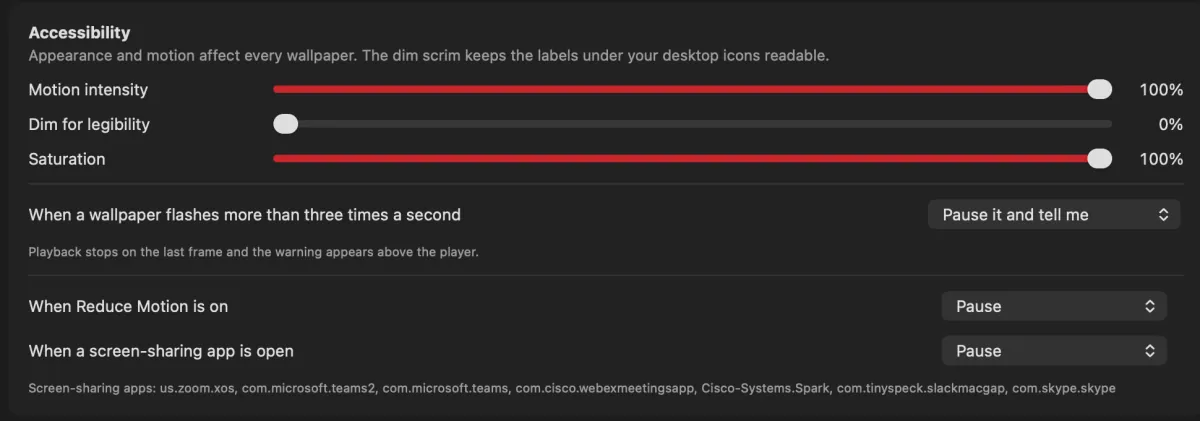
It listens when your computer says no animation
Turn on Reduce Motion on a Mac, or switch animation effects off in Windows accessibility settings, and Wallgami stops moving. The free market leader on Windows does the opposite: it requires that setting to be on, so turning on the accommodation breaks the app.
Flashing content gets caught
Wallgami checks videos and animated images against the accepted safety limit of three flashes a second. One that strobes is paused within about a second, and you are told why. Web wallpapers are not checked yet. We found nothing else in this category that checks for this at all.
You can still read your icon labels
A dimming layer that darkens the wallpaper behind your icon labels. On Windows it is applied while the screen is put together, so it costs nothing per frame. People have been asking for this for six years across three different apps.
Safe to share your screen
When Teams, Zoom or Webex opens a window, the wallpaper pauses on its own. You can also just switch it off from the menu bar (Mac) or the tray (Windows) before a call.
Get Wallgami
Free, for Mac and Windows 11.
- Find Wallgami in your Downloads. Safari unzips it for you; otherwise, double-click the zip.
- Drag Wallgami into Applications. On an account that is not an administrator, macOS asks for an administrator’s password here.
- Open it. macOS asks once whether to open an app downloaded from the internet. Wallgami is signed with an Apple Developer ID and notarized by Apple, so there is no warning to get past.
- Edge may say the file “isn’t commonly downloaded”, because it is new and not code-signed yet. Click … beside it and choose Keep; when Edge asks again, open the arrow beside Delete and choose Keep anyway.
- Open the installer from your Downloads. It installs for you alone, so it does not ask for an administrator. If Windows shows a blue “Windows protected your PC” box, click More info, then Run anyway.
- Click through the installer. It can also fetch the optional AI upscaler (about 43 MB) and start Wallgami with Windows; both are yours to untick.